Guide
Best Proxies For Twitter/X Automation And Scraping Guide
Find the best proxies for Twitter/X automation and scraping in 2026. Learn which residential, ISP, and mobile proxy types survive X's detection for account management, data collection, and ad verification.

Running X automation or scraping Twitter at scale in 2026 means operating against one of the most sophisticated anti-abuse systems on the web. X tracks IP reputation, login geography, request cadence, and cross-account patterns simultaneously. Getting any of those signals wrong results in rate limits, shadowbans, or permanent suspensions. Choosing the right proxy type for your specific workflow is the single most consequential infrastructure decision you will make.

This guide cuts straight to what actually matters: matching proxy type to task, evaluating providers on operational metrics rather than marketing copy, and avoiding the configuration mistakes that get accounts flagged even when you are using legitimate residential IPs. Whether your goal is large-scale data collection, multi-account management, or geo-targeted ad verification, the logic here applies directly to your setup. If you want to start testing with a credible residential proxy network before committing to volume, FlameProxies offers pay-as-you-go bandwidth with no expiry and a self-serve signup that takes under two minutes. Use code LAUNCH10 to get 10% off your first order.
What Actually Works For Twitter/X Use Cases

X applies different detection logic depending on what you are doing. Scraping public timelines, managing multiple authenticated accounts, and verifying ad placements all trigger different risk signals, which means the proxy strategy that works well for one workflow can actively hurt another.
Choosing Proxies For Twitter Scraping
Scraping public data from X, things like tweets, profiles, trending topics, and engagement counts, is primarily an IP-level rate limit problem. X throttles requests per IP address aggressively, and it identifies and blocks datacenter IP ranges quickly.
For twitter scraping at scale, rotating residential proxies are the practical default. Each outbound request routes through a different residential IP, which distributes your request volume across a large pool and keeps any single IP well below X's per-IP thresholds. The key variable is pool size. A small pool means each IP absorbs more requests, and burn rate climbs fast. Networks with tens of millions of IPs spread the load far more sustainably than smaller pools.
You do not need sticky sessions for pure scrape-twitter workflows unless you are maintaining a logged-in session between requests. For fully anonymous public data extraction, rotation-per-request works well.
Choosing Proxies For Twitter Automation And Account Workflows
Twitter automation and multi-account management operate under entirely different constraints. X correlates IP addresses with specific accounts over time. If your account has a login history from Chicago and it suddenly authenticates from a rotating residential IP in Frankfurt, that inconsistency is a flag.
For account logins and account management workflows, sticky sessions are non-negotiable. You want one dedicated IP per account, with geographic consistency matched to the account's established history. Best for multi-account setups are static residential or ISP proxies because they combine real ISP associations with the session stability that authenticated workflows require.
Choosing Proxies For Ad Verification And Geo-Targeted Research
Ad verification and geo-targeted research demand precise location control rather than raw rotation volume. You need to see what a specific user in Austin, Texas or São Paulo, Brazil sees, which means city-level targeting that actually resolves to real residential IPs in those locations.
Rotating residential proxies with country and city-level targeting cover most of these workflows. The quality signal here is whether the targeting is genuine, meaning the IP actually belongs to a device registered in that city, rather than a loose approximation. Providers that claim city-level targeting but route through regional gateways will produce inconsistent results for ad verification tasks.
Proxy Types And When To Use Each One
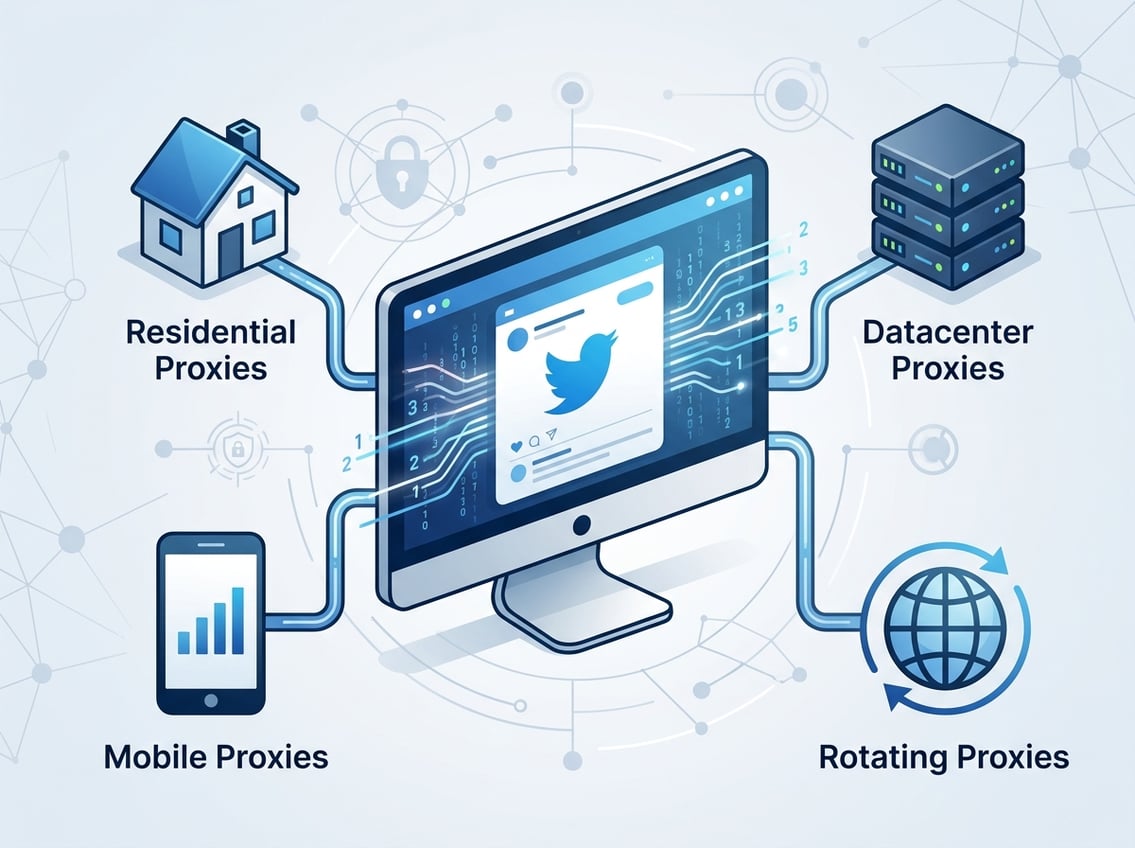
The four main proxy types sit at very different points on the trust, speed, and cost spectrum. Understanding where each type falls operationally matters far more than reading a feature comparison table.
Residential Proxies For Blending In With Normal Traffic
Residential IPs are assigned to actual households by ISPs, which means they carry legitimate consumer IP reputations. X cannot easily distinguish your automated requests from a real user browsing from that address. This makes rotating residential proxies the practical workhorse for most scraping and data collection work on the platform.
The main tradeoff is that residential IPs in a shared pool have varying cleanliness. Some have been used aggressively by previous users and carry residual flags. Choosing a provider with a large, ethically sourced pool reduces the probability that you are handed a burned IP.
FlameProxies runs a network of over 81 million residential IPs, which gives the pool enough depth to keep per-IP request loads low across concurrent scraping jobs.
Mobile Proxies For Login-Sensitive And Multi-Account Setups
Mobile IPs originate from carrier networks like AT&T or Verizon. Because millions of legitimate mobile users share small blocks of carrier IPs through NAT, X assigns much higher inherent trust to mobile IP ranges. A single mobile IP appearing to serve many requests is normal carrier behavior, not a bot signal.
This makes mobile proxies the right choice for high-value account management situations where a suspension would be costly. They are more expensive and have higher latency than residential options, so they are best reserved for sensitive operations rather than bulk scraping.
ISP And Static Residential Proxies For Session Stability
ISP proxies are static IPs registered to real ISP organizations but hosted on datacenter infrastructure. They combine residential trust scoring with the stability and speed that static IPs provide. Unlike rotating residential proxies, the IP does not change between sessions.
For workflows requiring persistent authenticated sessions, like scheduling tools or account management bots running long-duration tasks, ISP proxies offer a strong balance. Sticky sessions are default behavior, and the IP-to-account mapping stays consistent across days or weeks.
Why Datacenter Proxies Usually Struggle On X
Datacenter IPs originate from cloud providers, and X maintains regularly updated lists of these ranges. Detection risk is high, especially for anything involving authenticated accounts. Speed is their only genuine advantage, and that advantage rarely outweighs the ban rate on X specifically.
For public scraping of very low-frequency data where account associations are irrelevant, datacenter proxies can survive, but even then, success rates are noticeably lower than with residential IPs. For anything involving logins, account activity, or sustained data collection, datacenter proxies are a poor fit.
The Performance Signals That Matter Most
Raw pool size and proxy type are the starting point, not the finish line. The operational signals that actually predict whether a proxy setup will hold up on X are more specific than most provider comparison pages suggest.
IP Reputation And Cleanliness
IP reputation refers to the historical usage record attached to an IP address. A residential IP that has been hammered by previous users, used for spam, or previously flagged by X carries that history forward. Clean IPs with no prior abuse on X-adjacent services perform meaningfully better on first contact with the platform.
When evaluating providers, ask specifically about clean IP rate, which is the percentage of IPs in the pool with no prior abuse flags. Providers that continuously cycle burned IPs out of active rotation maintain cleaner pools over time. Ethical sourcing practices also matter here: IPs obtained through transparent consent are less likely to generate anomalous traffic patterns that attract attention.
Rotation Strategy And Sticky Sessions
Rotation strategy is not one-size-fits-all. For scraping, rotation-per-request or rotation-per-N-requests spreads load effectively. For account workflows, you want sticky sessions that persist for hours or days, keeping one IP consistently associated with one account.
The failure mode to avoid is using a rotating proxy for an authenticated account session. X sees repeated authentication attempts from different IPs as suspicious behavior, which accelerates detection even if each individual IP is clean.
Latency Response Time And Success Rate
Response time under 500ms to X's servers is a practical threshold for automation workflows. Higher latency causes timeouts that scraping frameworks retry, which in turn inflates your effective request volume and burns through your rate limit budget faster.
Success rate is the more direct metric: what percentage of your requests return the expected data without a block or CAPTCHA. Track this per task and per session, not just as an average, because success rate variance tells you more about IP pool quality than a single aggregate number does.
Targeting Depth From Country To City Level
Country-level targeting is the baseline. For most scraping tasks, routing through a specific country is sufficient. For ad verification and brand monitoring, city-level targeting lets you see geo-specific content and ad placements as local users see them.
The proxy network needs enough IPs in your target cities for city-level targeting to be reliable. Networks with thin city coverage will fail silently, routing you through a neighboring region without surfacing the discrepancy. Verify actual IP geolocation against provider claims during initial testing.
Twitter/X Scraping Without Wasting Requests

Wasted requests on X are more expensive than on most platforms. Between API costs, proxy bandwidth consumption, and the risk that failed requests push your IP toward a block threshold, inefficient scraping architectures burn through budget fast. The toolchain you choose matters as much as the proxy type.
When The Twitter API Is Not Enough
The official X API in 2026 operates on a pay-per-use model with strict tier limitations. At $5 or more per 1,000 tweets, high-volume data collection through the official API becomes prohibitively expensive for many research and competitive intelligence use cases.
The API also imposes endpoint restrictions, historical data limitations, and field-level access constraints that make it unsuitable for certain data types entirely. This is where scraper-based collection becomes the practical alternative, with proxies serving as the access layer.
Managing Rate Limits Blocks And Retries
Rate limit management is where most scraping setups fail first. X applies limits at both the IP level and the account level. Hitting a limit on one IP does not mean you rotate immediately and keep hammering; that pattern is itself a signal.
Implement exponential backoff on retries, not immediate retry with a new IP. Spread request volume deliberately across your proxy pool rather than maxing out a single IP first. Track which IPs have hit limits in the current session and deprioritize them for a cooldown window before reuse.
Browsers Scrapers And Unblocker Tools
Headless browser automation with anti-detect browsers adds a fingerprinting layer on top of IP-level proxying. For X specifically, pairing an anti-detect browser with residential proxies handles both IP-based and browser fingerprint-based detection simultaneously.
A web unblocker or scraper API that handles proxy rotation and JavaScript rendering internally is a practical option for teams that want to skip managing proxy infrastructure directly. The tradeoff is less granular control over rotation logic and higher per-request cost.
How To Scale Public Data Collection More Safely
For large-scale data collection, distribute requests across multiple proxy sessions with realistic inter-request timing that mimics human browsing cadence. Avoid scraping the same endpoint in a tight loop from the same IP.
Segment your IP pool by task. Use one subset of your residential IPs for scraping and a separate subset for any authenticated account activity. Mixing scraping IPs with account management IPs creates cross-contamination risk where a burned scraping IP also affects account-linked workflows.
How To Compare Proxy Providers Objectively

The proxy provider market is crowded, and most comparison pages rank providers by affiliate value rather than operational fit. A more useful evaluation framework focuses on task-specific performance rather than brand recognition.
Comparing Networks By Task Instead Of Brand Hype
Providers like Bright Data, Oxylabs, and Smartproxy operate at enterprise scale with large residential and ISP networks, which suits high-volume operations with dedicated support requirements. Decodo, IPRoyal, SOAX, and ProxyEmpire sit in the mid-tier range with competitive residential pricing and reasonable pool depth. Webshare, NetNut, DataImpulse, Proxy-Seller, NodeMaven, and Rayobyte fill various niches across datacenter, residential, and ISP categories.
The brand name tells you less than the actual metrics: pool size in your target geographies, verified clean IP rate, sticky session duration limits, and the provider's published acceptable use policy for social media and automation workloads.
Run a small test batch against X-specific endpoints before committing to any provider. Measure success rate directly, not against generic benchmarks but against the exact requests your production workflow will make.
Pricing Models Protocols And Operational Fit
Pricing models vary significantly. Bandwidth-based billing suits scraping workflows where you can predict data volume but not request count. Per-IP billing suits account management workflows where you need a fixed number of dedicated IPs for an extended period.
SOCKS5 support matters for certain automation frameworks and anti-detect browser configurations. HTTP proxies cover most scraping use cases, but if your toolchain requires SOCKS5, verify that the provider supports it at the tier you are evaluating.
Pay-as-you-go pricing removes commitment risk when you are still validating a workflow. Providers that lock you into monthly minimums before you have confirmed real-world success rates are a poor fit for early-stage testing.
Why Free Proxies Are Rarely Worth The Risk
Free proxies introduce three distinct problems for X work specifically. First, they are shared by large numbers of users, meaning the IPs are almost certainly flagged or heavily throttled on X already. Second, free proxy operators frequently log and monetize traffic, which is a serious concern for any authenticated account workflow. Third, they are unstable, with unpredictable uptime and no SLA.
The cost of a ban on a high-value X account, or a data leak through a compromised free proxy connection, far exceeds any bandwidth savings. Free proxies are not a cost optimization; they are a risk addition.
A Practical Buying Checklist Before You Commit

Before purchasing proxy bandwidth or committing to a provider contract, a structured pre-purchase checklist prevents the most common mismatches between what a provider offers and what your workflow actually requires.
Match The Proxy Type To The Workflow
Start by writing down exactly what each proxy will be doing. Authenticated account logins require static or sticky residential/ISP proxies with geographic consistency. High-volume public data scraping requires large rotating residential pools. Ad verification requires city-level targeting with genuine residential IPs in specific markets.
If a single workflow has multiple requirements, consider segmenting your proxy budget across two pool types rather than forcing one type to cover everything. The cost of using the wrong proxy type is usually higher than the cost of running two smaller specialized pools.
Validate Geography Session Control And Ease Of Setup
Before buying at volume, confirm that the provider actually delivers on geographic targeting claims. Test city-level targeting against a geo-check tool independent of the provider's own IP lookup. Verify that sticky sessions hold for the duration your workflow requires, not just the advertised maximum.
Ease of setup is also worth evaluating practically. Some providers require API integration work before you can start routing traffic. Others offer a proxy generator or dashboard that lets you start within minutes. If your team does not have bandwidth for complex integration, self-serve onboarding with minimal configuration reduces time-to-production significantly.
Start Small And Measure Real-World Results
Always start with minimum viable bandwidth, not your anticipated monthly volume. Run your actual production requests through the proxy, not synthetic benchmarks, and measure success rate, response time, and IP burn rate under real X conditions.
Pay-as-you-go pricing makes this testing phase financially low-risk. Bandwidth that does not expire removes the pressure to use up a monthly allowance before you have confirmed the configuration works. Once you have confirmed that your success rate is acceptable and your IPs are staying clean across your target workflows, scaling up is straightforward.