Guide
Best Proxies For Scraping LinkedIn Without Getting Blocked
Learn how to choose the best proxies for scraping LinkedIn without getting blocked. Covers residential, mobile, and ISP proxy types, session management, anti-detect browsers, and multi-account setups.
Scraping LinkedIn at scale is one of the harder data engineering challenges you will run into in 2026. Finding the Best Proxies for Scraping LinkedIn Without Getting Blocked is a key part of using modern scraping tools to harvest data effectively. When searching for the best linkedin proxies, practitioners must consider more than just the price per gigabyte.
The platform runs aggressive anti-bot systems, monitors behavioral patterns continuously, and will restrict or ban accounts and IPs that look even slightly out of place.
The proxy you choose is only one piece of the puzzle; how you configure sessions, rotate IPs, and simulate realistic behavior determines whether your setup survives past the first few hundred requests.
This guide is written for growth teams, recruiters, data engineers, and technical operators who need LinkedIn data for research, lead generation, or account workflows. It covers why blocks happen, which proxy types fit which use cases, and how to build a setup that holds up under sustained operation rather than just for a quick test run. If you want to get started quickly with clean residential IPs and pay-as-you-go flexibility, FlameProxies lets you explore the dashboard and generate proxies in under two minutes with no sales call required, and there is a 10% discount on your first order with code LAUNCH10.
What Actually Gets LinkedIn Traffic Blocked

LinkedIn blocks traffic through a layered detection system. The platform is highly sensitive to social media automation and any form of account automation that deviates from standard human browsing. Proper proxy setup is essential to bypass these checks during web scraping.
IP reputation is the most obvious layer, but it rarely acts alone. Rate limiting, browser fingerprint analysis, device fingerprinting, and behavioral pattern matching all run simultaneously.
IP Reputation, Rate Limiting, And Rotating IPs
IP reputation is evaluated before your request even processes. Datacenter IP ranges are publicly catalogued, and LinkedIn's systems recognize them immediately. Residential IPs from legitimate ISPs carry higher trust scores because they match the profiles of real consumer devices.
Rate limiting hits when you send too many requests too quickly from a single IP. Even a clean residential IP will get throttled if it behaves like a bot: constant request intervals, no pauses, no variation. Rotating IPs on every request can help with rate limiting, but naive rotation introduces its own risk. Switching IPs mid-session or cycling too fast can itself be a behavioral signal.
The practical rule is this: rotate at natural session boundaries, not on every single request.
Browser Fingerprint, Device Fingerprinting, And Behavioral Patterns
LinkedIn tracks more than your IP. Browser fingerprint data, including your user agent string, screen resolution, timezone, installed fonts, and WebGL renderer, creates a device profile. When that profile changes between requests, or conflicts with your apparent geo-location, the discrepancy flags automated traffic.
Device fingerprinting extends this further. Canvas fingerprints, audio context, and hardware concurrency values are all collectable signals. Technical teams often utilize antidetect browsers to mask these signals and maintain a proxy for LinkedIn that remains undetected.
Your scraper or browser automation tool needs to present a consistent, realistic fingerprint for the entire session.
Behavioral patterns matter just as much. Human users pause, scroll irregularly, revisit pages, and interact with varying timing. Scrapers that fire requests at machine-regular intervals look exactly like what they are.
Why Session Management Matters More Than Raw Proxy Volume
A common mistake is treating proxy volume as the primary defense. Throwing thousands of IPs at LinkedIn without controlling session behavior does not improve success rates meaningfully. What matters is session integrity: each session should appear to belong to a single, consistent user with a stable IP, a matching fingerprint, and realistic interaction timing.
This means session management is operationally more valuable than raw proxy count. A well-managed pool of 50 residential IPs with tight session discipline will outperform 5,000 datacenter IPs rotating chaotically. Sticky sessions tied to consistent fingerprints are where you actually reduce block risk.
Which Proxy Types Fit LinkedIn Use Cases
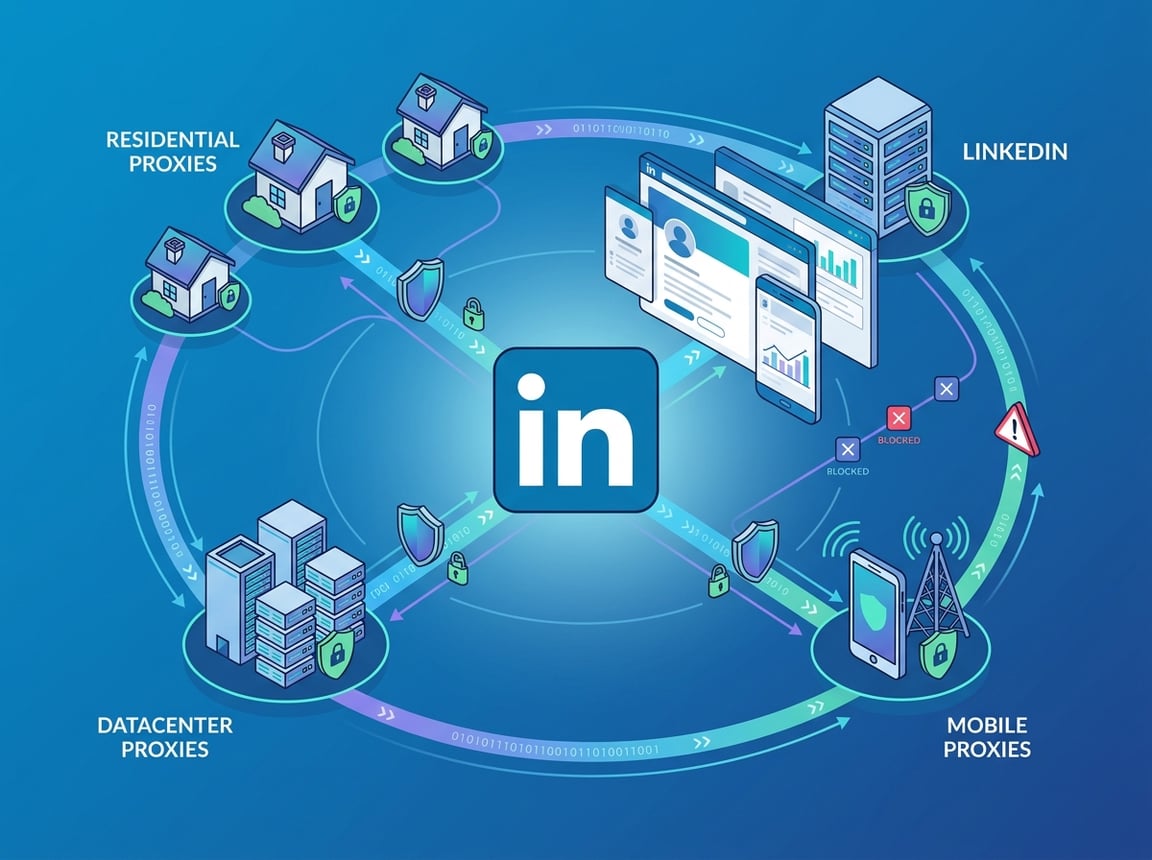
Not every proxy type performs equally against LinkedIn's detection systems. Residential proxies dominate for most workflows, but mobile IPs, static residential proxies, ISP proxies, and datacenter proxies each have a realistic place depending on what you are actually doing and what risk tolerance your operation has.
Residential Proxies For LinkedIn Data Collection
Residential proxies route your traffic through real consumer IP addresses assigned by legitimate ISPs. From LinkedIn's perspective, requests look like they originate from actual users. This is why residential proxies are the default choice for scraping user profile data, company pages, job listings, and public content at scale. This is why residential proxies are often cited among the best linkedin proxies for profile data extraction.
The key advantages are trust score and availability. A residential IP pool with millions of addresses means you are unlikely to exhaust clean IPs. Using high-quality residential IPs is vital for successful linkedin scraping. Providers like FlameProxies offer rotating residential proxies across a network of over 81 million IPs. They provide country and city-level targeting, which is useful when you need to scrape geo-specific data or verify content. Other well-known linkedin proxy providers like Bright Data, Soax, IPRoyal, and Webshare also offer similar geographic targeting options.
Pay-as-you-go bandwidth pricing means you are not locked into a fixed monthly commitment if your scraping volume fluctuates.
Mobile Proxies And Mobile IPs For Higher-Trust Activity
Mobile IPs come from carrier-assigned addresses on 3G, 4G, and 5G networks. LinkedIn treats mobile traffic with particularly high trust because carrier IPs are shared among large populations of real users. This creates a situation where even aggressive usage from a mobile IP is statistically harder to isolate as bot traffic.
Mobile proxies are especially useful for account-based workflows: login sessions, connection requests, and outreach automation where you need the highest possible trust signal. The trade-off is cost. Mobile IPs are significantly more expensive per GB than residential proxies, so using them for bulk public data scraping is usually not economical.
Static Residential Proxies, ISP Proxies, And Datacenter Proxies Compared
Static residential proxies and ISP proxies occupy a middle tier. They use IP addresses assigned by ISPs rather than hosting providers, making them a reliable proxy for LinkedIn. These are ideal for a multi-account LinkedIn strategy where session continuity matters more than IP variety.
Datacenter proxies are fast and cheap but are registered to hosting providers. LinkedIn flags datacenter ranges aggressively. You can occasionally get away with them on less-protected public endpoints, but for anything requiring sustained access or account safety, the block rate is too high to rely on. They are best avoided for LinkedIn unless you have a very specific low-risk use case and are testing tolerance on a throwaway setup.
The Safest Setup For Scraping And Account Workflows
Getting your proxy type right is only the start. To effectively manage multiple LinkedIn accounts, you need to configure sticky sessions and maintain internal fingerprint consistency. The difference between a setup that runs for months and one that burns through IPs in a day comes down to how you handle multi-account risk. Professional social media automation requires a stable proxy setup that mirrors real user behavior. You must ensure that you manage multiple linkedin accounts with dedicated, isolated environments to prevent linked bans.
When To Use Sticky Sessions Versus Rotation
Sticky sessions lock an IP to a single session for a defined duration. Rotation assigns a new IP on each request or at timed intervals. Choosing between them is not about preference; it is about what action you are performing.
Use sticky sessions when:
-
You are logged in to a LinkedIn account
-
You are simulating a single user browsing a profile sequence
-
You are running outreach or connection request workflows
Use rotation when:
-
You are scraping public pages without authentication
-
You are distributing a large batch of requests across many IPs to avoid rate limiting on any single address
-
You are hitting endpoints that do not require session continuity
Mixing the two without discipline is where things break. A session that starts on one IP and continues on another looks like a session hijack or bot handoff, which is a strong detection signal.
Proxy Setup For Multi-Account Management And Account Warm-Up
Managing multiple LinkedIn accounts through a single machine without proxy isolation is a reliable way to get all of them flagged simultaneously. LinkedIn links accounts that share IPs, cookies, or browser environments.
The correct setup assigns a dedicated proxy IP to each account, ideally a static residential or ISP IP that does not rotate unexpectedly. Pair that with browser profile isolation so each account has its own cookie store, local storage, and fingerprint environment.
Account warm-up matters just as much. A freshly created account that immediately sends 100 connection requests from a new IP looks automated regardless of proxy quality. Gradually increase activity over days or weeks, simulate organic browsing patterns, and let the account establish behavioral history before scaling outreach.
Anti-Detect Browsers, GoLogin, And Fingerprint Consistency
Anti-detect browsers like GoLogin, AdsPower, and Multilogin create isolated browser profiles with independent fingerprint configurations. Each profile can present a different operating system, screen resolution, browser version, timezone, and WebGL hash. Paired with a dedicated proxy per profile, this is the closest you can get to simulating genuinely separate users.
Fingerprint consistency within a session is the critical rule. Do not change the user agent mid-session, do not let your IP geo-location conflict with your browser timezone, and do not swap canvas fingerprints between page loads. The fingerprint and the proxy IP need to tell the same story throughout the session. Inconsistency is what triggers flags, not the fingerprint values themselves.
Choosing A Provider Without Overpaying
The proxy market is crowded and noisy. Most providers claim similar things: large IP pools, global coverage, high success rates. The practical differences show up in IP quality, geo targeting precision, pricing structure, and how the pool behaves under sustained LinkedIn scraping rather than benchmark tests.
What To Look For In Proxy Providers
Identifying the best linkedin proxies requires a balance between cost, performance, and the anonymity of the IP pool. Before comparing specific LinkedIn proxy providers, the checklist that actually matters in production is:
-
IP pool freshness: How often are IPs cycled? Stale IPs accumulate negative reputation quickly on high-security targets like LinkedIn.
-
Ethical sourcing: Providers that source IPs transparently from consenting users produce cleaner traffic profiles and are less likely to serve IPs that have already been flagged in bulk.
-
Session control: Can you specify sticky session duration? Can you switch between rotating and sticky modes programmatically?
-
Failure transparency: Does the provider give you visibility into block rates and IP health, or do you only discover problems when your scraper dies?
Well-known providers in this space include Bright Data, Oxylabs, Smartproxy, SOAX, IPRoyal, Webshare, ProxyEmpire, NetNut, Infatica, Rayobyte, PrivateProxy, and DataImpulse. Each has different pricing tiers, pool sizes, and session management capabilities.
Geo Targeting, City-Level Targeting, And Proxy Pool Quality
Country-level targeting is the baseline. City-level targeting is what separates capable providers from basic ones for LinkedIn-specific use cases. If you are collecting recruiter data from specific metro areas, verifying ad placements in particular cities, or researching local job markets, country-level targeting is too coarse.
City-level targeting also lets you match your proxy geo-location to your browser timezone and locale settings, which reduces fingerprint inconsistency risk. Providers that offer granular geo targeting without significantly inflating cost per GB are meaningfully more useful for sustained LinkedIn work.
Pool quality matters more than raw pool size. A provider advertising 100 million IPs that are half-burned from previous scraping is worse than one offering 20 million clean, recently rotated addresses.
When A Scraper API Or Scraping API Makes More Sense
A scraper API or scraping API abstracts proxy rotation, fingerprint management, and CAPTCHA handling into a single endpoint. This is a popular choice for web scraping when internal infrastructure is limited. Instead of managing your own proxy pool and session logic, you send a request and receive a parsed result. This simplifies linkedin scraping by letting the provider handle the technical complexities of rotation. Many top linkedin proxy providers, such as Bright Data and Soax, offer these API solutions alongside traditional proxies.
For teams that do not want to maintain scraping infrastructure, this model reduces operational overhead significantly. The trade-off is cost per request versus cost per GB, and less granular control over session behavior. For LinkedIn specifically, the reduced control can be a meaningful limitation for account-based workflows where session consistency is critical. Scraper APIs tend to work better for public, unauthenticated data collection than for anything that requires a logged-in account.
Matching Your Setup To Real LinkedIn Goals
The proxy type and session strategy that work for bulk profile scraping are different from what you need for outreach automation or multi-account management. Mismatching your setup to your actual workflow is one of the most common operational errors.
Lead Generation, LinkedIn Outreach, And LinkedIn Automation Tools
Lead generation and LinkedIn outreach workflows involve authenticated sessions. Scaling B2B lead generation requires you to be logged in, sending connection requests, and viewing profiles while appearing like a genuine user.
Using LinkedIn automation tools like Dripify, Linked Helper, or LaGrowthMachine requires a browser-like environment where each account needs its own consistent IP and fingerprint.
For this use case, static residential proxies or ISP proxies paired with an anti-detect browser profile are the standard setup. Rotating residential proxies are less suitable here because IP changes mid-session disrupt session continuity and increase detection risk. The goal is to make each account look like a single human user operating from a fixed location.
Volume discipline matters too. LinkedIn automation tools that push daily connection limits aggressively will get flagged even with clean proxies. Proxy quality extends your runway; it does not eliminate the risk of over-automating.
LinkedIn Scraper Workflows For Market Research And Data Extraction
LinkedIn scraper workflows focused on market research, pricing intelligence, company data, or talent mapping are generally unauthenticated or use low-activity authenticated sessions. Here, rotating residential proxies are the correct choice. You want IP variety across requests to avoid rate limiting, and you do not need session continuity for public page scraping.
For LinkedIn data extraction at scale, the practical setup is rotating residential proxies with request throttling, randomized delays between requests, and realistic user agent strings. Sticky sessions can still be useful for multi-page scraping sequences on a single target, such as paginating through a company's employee list, but you want rotation between different targets.
When Residential Proxies Beat Mobile Proxies And Vice Versa
Residential proxies win on cost efficiency for bulk data collection. If you are scraping thousands of public profiles, job listings, or company pages, the cost per GB of residential proxies is substantially lower than mobile IPs, and the trust level is sufficient for most unauthenticated scraping workflows.
Mobile proxies win on trust score for account-based activity. When you are running outreach from a LinkedIn account, sending invitations, or operating automation tools that simulate real user behavior, the higher inherent trust of carrier IPs reduces the probability of triggering security checkpoints. If your accounts are getting flagged even with residential proxies and disciplined session management, moving to mobile IPs is often the lever that stabilizes operation.
Common Mistakes And Lower-Risk Alternatives
Most LinkedIn scraping failures are not caused by sophisticated detection technology. They are caused by predictable operator errors: wrong proxy type, no session discipline, and ignoring the signals that indicate a setup is degrading before a full block lands.
Why Datacenter Shortcuts Usually Fail
Datacenter proxies are the most common first choice and the most common source of early failures. The economics are appealing: fast, cheap, easy to spin up in volume. The problem is that LinkedIn proxies based on datacenter IPs are operating against a strong headwind from the start.
LinkedIn's systems maintain active blocklists of known datacenter IP ranges. Many of these ranges are flagged at the ASN level, meaning entire hosting provider address blocks are treated with high suspicion by default. Even a fresh, never-used datacenter IP from a common provider may already sit in a suspicious range.
Using datacenter proxies for LinkedIn is a reasonable experiment for testing endpoints or confirming response formats. Relying on them for sustained data collection or account workflows will produce high block rates and unpredictable behavior that wastes engineering time.
How To Reduce Restrictions Across Accounts And Sessions
Reducing linkedin proxies-related restrictions is partly a proxy question and mostly a behavior question. The practical steps that make a consistent difference:
-
Set realistic daily request limits and build in randomized delays
-
Never share an IP across multiple accounts simultaneously
-
Keep browser fingerprints stable within a session and consistent across sessions for the same account
-
Use geo-matched proxies so your IP location, browser timezone, and language settings align
-
Warm up new accounts gradually before running any automation
-
Monitor for soft signals like increased CAPTCHA frequency or slower response times before a full block lands
These steps reduce restriction probability across accounts without requiring you to spend more on proxies.
When To Consider Licensed Data Or Off-The-Shelf Datasets
There are use cases where web scraping is simply not the right tool for LinkedIn data extraction. If you need historical data, high-volume structured records, or consistent coverage across millions of profiles, licensed datasets or data providers that aggregate LinkedIn-sourced information legally may be more practical and less operationally intensive than maintaining your own scraping infrastructure.
LinkedIn's own data licensing programs and third-party providers who work within LinkedIn's terms of service can supply structured data without the risk of account restrictions or IP bans. For market research and talent intelligence teams that need reliability and legal clarity over operational control, this is worth serious consideration. Scraping makes sense when you need real-time data, specific targeting, or access to data that licensed sources do not cover.